
Return to Intent
Guide & tips
Getting started, choosing a pause intensity, and getting the most out of temporary visits.
Updated 2026-08-27
Getting started in five steps
Return’s built-in onboarding walks you through a first rule with real production behavior — no screenshots to decode, just click where it highlights:
- Pick a website that pulls you in on autopilot.
- Click the Return icon in the toolbar.
- Choose “Add current website” in the popup.
- Check the prefilled defaults — include subdomains, every day, pause-first all day — then save. Chrome asks for access to that one website only, at this exact moment.
- Test it: open the site and meet your first pause.
Return requests no website access at installation. Each site is authorized individually, only when you save a rule for it.
Choose your pause intensity
The pause grows slightly on repeated same-day visits to the same site, because the second and third visits are usually the habitual ones:
| Preset | 1st visit | 2nd visit | Later visits |
|---|---|---|---|
| Gentle | 4s | 8s | 12s |
| Standard | 6s | 12s | 18s |
| Strong | 10s | 20s | 30s |
Start with standard. If you notice yourself waiting out the pause on autopilot, move up to strong; if the pause feels like punishment, move down. A pause you resent is a pause you’ll uninstall.
Make temporary visits work for you
Continuing is not failing — it’s the other half of the product. A good temporary visit has a purpose and an end:
- Name the purpose honestly. “Check one message” and “conscious break” are both legitimate. The wording is for you, nobody else sees it.
- Pick the duration separately. A preset purpose only suggests a duration; it never locks it. One minute is enough for a lookup — let it be one minute.
- Watch the badge, not the clock. The toolbar badge counts down your active visit. An optional reminder can appear one minute before the end.
- Extend deliberately. When time is up, one explicit click continues the same task with the same purpose — no replayed pause, but also no silent drift into a new session.
- Finish early when you’re done. The popup always offers an early finish.
Rules, groups, and schedules
- A rule can match one exact hostname or include all subdomains.
- Group sites that belong together — all your feeds, all your news — and give the group one shared schedule.
- Schedules follow your device’s local day and time. Weekday selections and multiple pause-first windows are supported.
When you need Return to step aside
Real life includes days when the pause would just be noise. Pause Return itself for one hour, for the rest of today, or until a date and time you choose — it resumes automatically. No streak was broken, because there is no streak.
Review without judgment
The review page shows your pauses, returns, and temporary visits as plain local records — how often the pause led you elsewhere, which sites you visit with intent.
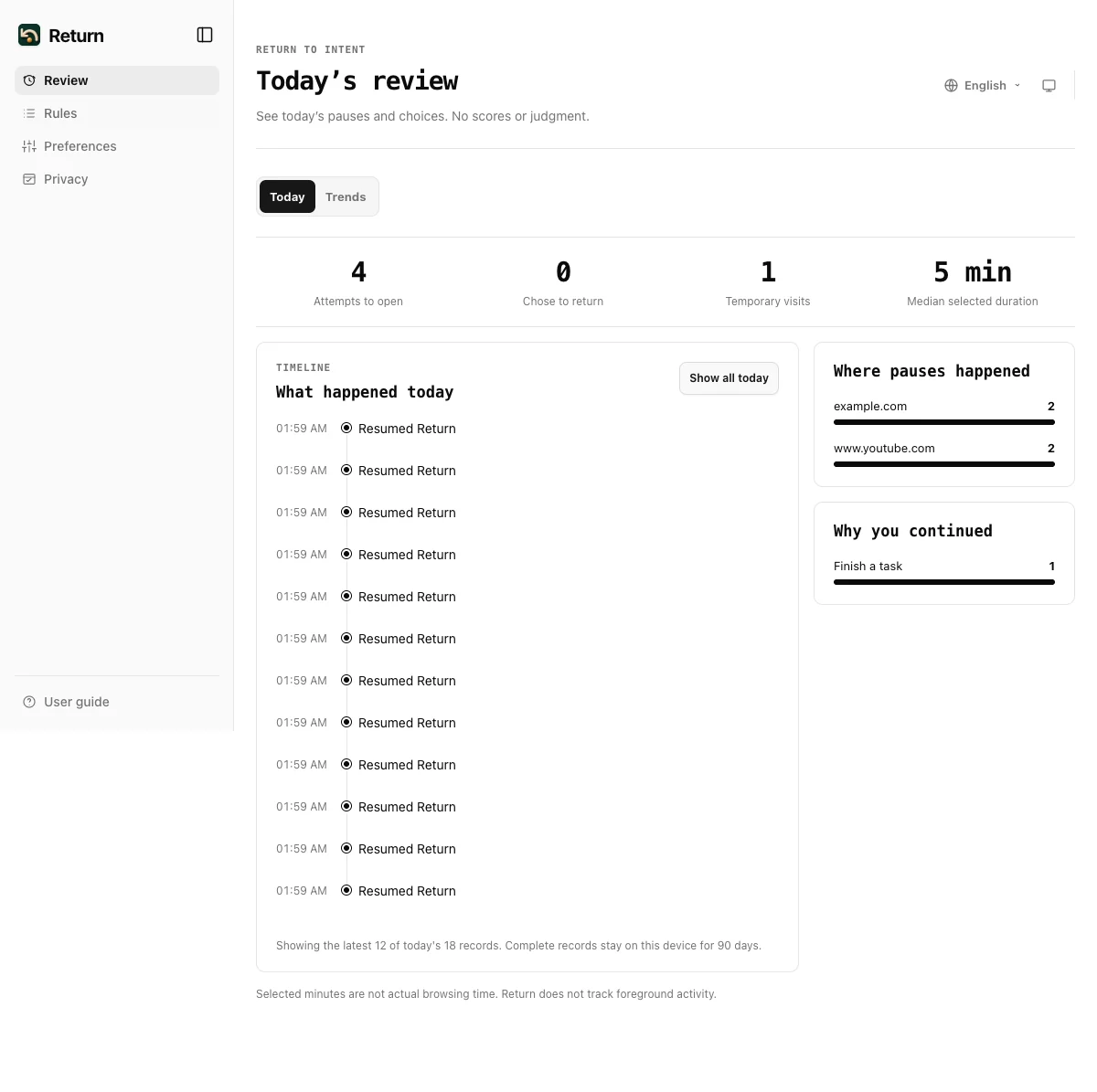
Records stay on this device for 90 days by default (configurable to 180 or 365), and you can export everything as JSON or CSV, or delete it all, at any time.
Small tips from daily use
- Start with one or two websites, not ten. The pause works by being noticed; if every page pauses, nothing is noticed.
- Put the first rule on the site you open before you realize it. That’s the one where the pause pays for itself.
- Revisit your rules after two weeks. Delete the ones you no longer meet — a short rule list you respect beats a long one you ignore.